APPLE

Does your iPhone take 7MP and not 12MP selfies? Here’s how to restore full resolution!
Many users complain about the lower resolution of some selfies taken by the internal camera of the most recent iPhones with TrueDepth Camera and have noticed that the shots are at 7MP and not at 12MP; let’s find out how to restore the maximum resolution and get 12MP shots.
Why do iPhones shoot at 7MP?...All iPhones with TrueDepth Camera, to be clear the one that guarantees unlocking via Face ID, starting from the iPhone 11, are capable of take 12MP front photos. However, the OS favors 7MP shots as it crops the image.
Here are the iPhones on which it is possible to act:
iPhone 11
iPhone 12
iPhone 13
iPhone 14
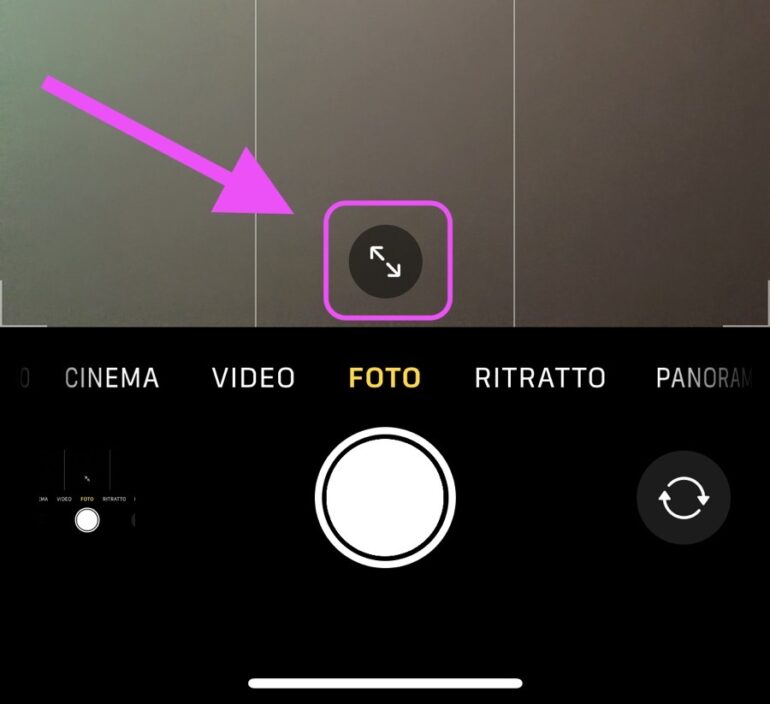
How to restore the full 12MP resolution for selfies on iPhone...The solution is really very simple: to restore the maximum 12MP resolution on iPhone self-portraits, that’s enough tap the button that portrays the two arrows, located at the bottom of the camera interface when shooting. This way, the iPhone will take full-resolution, 12-megapixel images, and will no longer crop the 7-megapixel image to fill the frame.
Apple, in his user manual(https://support.apple.com/it-it/guide/iphone/iph1b88429a6/ios) states that that button is used to increase or decrease the field of view, a useful option to better center the subjects if there are many people in the same selfie or just one, but does not specify that this choice also affects the resolution.
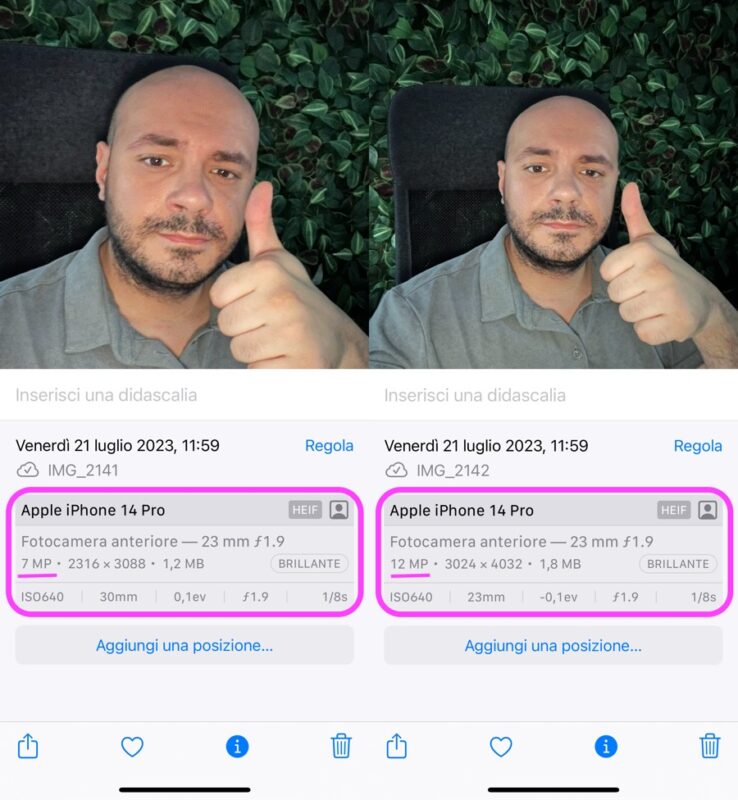
Check the resolution from the Photos app...An easy way to find out the resolution of the photos you have taken is to go to the Photos app, scroll up to find out the details about the image, a trivial swipe-up, and read how many MPs the shot is. Basically, however, just look at the position of the arrows in the button described above to understand what resolution you are shooting at:
-If the arrows point outward, you’re shooting at 7MP
-If the arrows point inward, you’re shooting at 12MP
Of course, as he also claims iDownloadBlog(https://www.idownloadblog.com/2023/07/20/iphone-camera-selfie-resolution-tutorial/) the photos taken before pressing this button will remain of the same resolution while it will be possible to act on all the new selfies taken from the iPhone according to your needs.
Reporter: Francesco Siciliani


No comments:
Post a Comment