DIGITAL LIFE
Passkeys Vs Passwords: What's the difference and which offers better security?
Since the inception of the internet, website and app developers have relied heavily on passwords as a means of protecting user accounts. As hackers continue to develop more sophisticated techniques to circumvent security guardrails, however, it has become easier for passwords to be cracked, especially with the help of powerful GPUs and AI assistance. A recent study reported that some GPUs could crack passwords with as many as 10 characters in a second or less. The vulnerability of user accounts protected by passwords has motivated many companies to explore alternative methods for protecting user accounts. One such alternative is passkeys. But do passkeys really offer better security?
The Difference Between Passkeys And Passwords...Passkeys are different than passwords. Unlike passwords, which enable users to authenticate via a set of numbers, letters, and special characters, or a combination thereof, passkeys allow users to access accounts using a PIN, face recognition or fingerprint authentication. So you do not need to memorize any string of characters.
Both passwords and passkeys can incorporate multi-factor authentication (MFA). Passkeys protect users with built-in MFA, which requires you to prove at least two things. First, that you can access a device where your private key is stored, and second, that you can unlock the device or account with your biometric information or PIN. Depending on the design, the use of passwords sometimes requires MFA, which typically prompts users to input a code that is automatically sent via email, SMS, or an authentication app.
Do Passkeys Really Offer Better Security? Which is safer, password MFA or passkey MFA? Let's say you've been lured to access a fake website that mimics the interface of one of your social media accounts. If you input your password, malicious actors can steal it and capture your MFA code in real time and use these credentials to access your actual account. This can be done relatively easily, for experienced hackers. We have reported how hackers circumvent MFA restrictions by using sophisticated malware to create an illusion of a normal login process.
However, with a passkey, the outcome is different. Even if a bad actor successfully lures you into using your PIN, facial ID or fingerprint on a fake website, your device will detect that the site is fake, making it difficult or even impossible to steal your credentials.
To understand how passkeys identify fake sites, it's helpful to know about a process developers call "domain binding." When you create a passkey for a site, a public and private key are generated and bound to that site's domain. Unlike humans who may sometimes fail to differentiate between URLs such as Hothadware.com and Hothardware.com, your device will never release the private key needed for passkey authentication if the URL is not exactly the same. The public key is typically stored on a server, and the private key is usually kept locally on your device. In the event of a data breach on a company's server, hackers can successfully access your public key; however, this will be useless for them since they will also need to access the private key, which is safely stored on your device. As such, if a company suffers a data breach, it will not compromise your account.
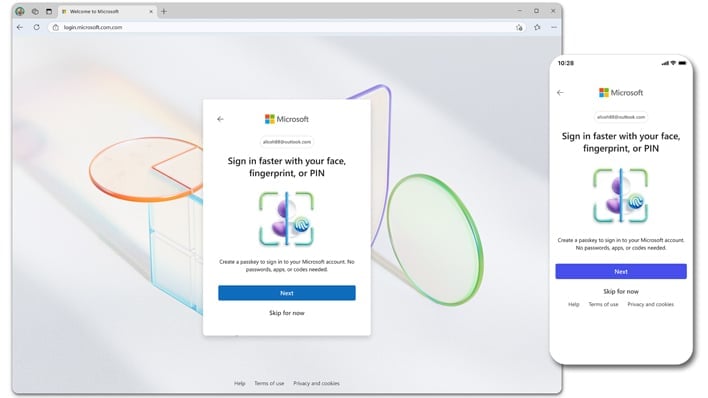
Although a PIN can be used to activate a passkey, it serves a different purpose than a traditional password. When you use a PIN to authenticate with a passkey, it simply unlocks your private key, which is then combined with the public key to complete the authentication process. Unlike passwords, which are stored on servers as hashed values that can be exposed in the event of a cyberattack, your PIN and private keys are never stored on a company's server. Only your device knows your private key; it will remain unknown to everyone, including you, so it's incredibly difficult for it to be compromised.
Final Thoughts: Passkeys vs. Passwords...Companies like Google, Apple, and Microsoft have embraced and promoted the use of passkeys. In April 2025, Microsoft optimized its login experience for the use of passkeys. While we are not suggesting that Passkeys are 100% secure, it is clear that they are generally safer than passwords, as they protect users from common social engineering techniques deployed by hackers.
by Victor Awogbemila


No comments:
Post a Comment