AORUS
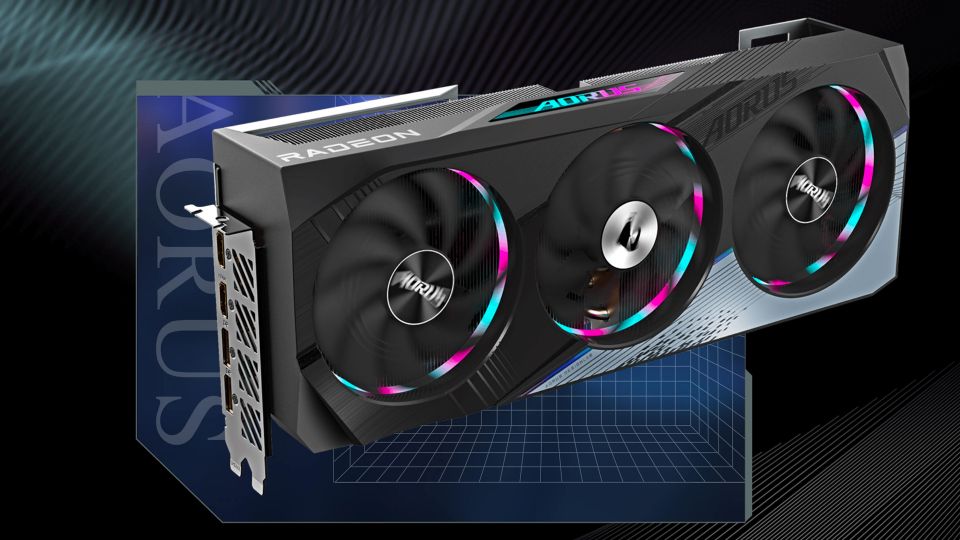
Aorus Radeon RX 7900 XTX Elite 24G: Top equipment at a great price
The new Aorus Radeon RX 7900 XTX Elite 24G is currently cheaper in our country than a number of much less equipped Radeons from the competition. For a favorable price, you will get superior equipment including a powerful cooler with a large reserve and high overclocking directly from the manufacturer, probably the only downside is the associated higher consumption.
We already looked at the reference Radeon RX 7900 XT a few weeks ago. Today we have the first test of one of the non-reference models. At the outset, I’ll just remind you that AMD introduced the new RDNA3 architecture last November.
The first models of the new generation are Radeon RX 7900 XTX and RX 7900 XT. Both are equipped with the largest graphics chip with the RDNA3 architecture, codenamed Navi31. It is the first graphics chip divided into a large computing core (GCD) and smaller chiplets (MCD), into which the infinity cache and memory controllers have been moved.
The more powerful RX 7900 XTX is equipped with a chip with a fully active core, 24 GB of GDDR6 memory with a speed of 20 Gb/s connected via a 384b bus. The recommended price from AMD is $999, which translates to roughly 27,400 crowns including tax.
In the RX 7900 XT, the chip has slightly worse parameters, it has only five functional MCD chiplets forming 80 MB of infinity cache and a 320b bus, on which 20 GB of GDDR6 memory with a speed of 20 Gb/s is connected. The recommended price is 24,600 crowns with VAT at the current exchange rate.
With both new models, AMD is currently targeting the competitive 16GB GeForce RTX 4080. It has a suggested retail price starting at $1,200, which is 33,500 crowns including VAT at the current exchange rate. From below, the weaker RX 7900 XT is pushed by the usually cheaper GeForce GTX 4070 Ti. It has a noticeably lower price, but also generally lower performance and worse equipment. Especially in terms of memory, with 12 GB GDDR6X, it is worse than the RX 7900 XT, but to some extent it compensates, in addition to the lower price, with lower consumption, better operational characteristics, wider support for DLSS 2.x titles compared to the competing FSR 2.x and the new DLSS 3.
AMD considers the small dimensions of the reference cards compared to the GeForce RTX 4080 Founders Edition, the support of the new DisplayPort 2.1 standard between the outputs to be key competitive advantages. Thanks to this, you will also be able to connect monitors with high resolutions and higher refresh rates than HDMI 2.1 allows, which will come to the market next year. It also boasts an additional power supply using classic eight-pins. And the benefit is an even higher memory capacity. Currently, 20 or 24 GB won’t be much valid for you in games, but if you don’t change the card that often again, the situation may be different in four years. I won’t scare you by saying that 16 GB of memory on the RTX 4080 will not be enough, but it is possible that there will be a few games that can use more than the 16 GB of memory.
Aorus Radeon RX 7900 XTX Elite 24G...Gigabyte currently offers three model series of Radeons. In addition to the reference version, there is the even cheaper Radeon RX 7900 Gaming OC series and the AORUS Radeon RX 7900 ELITE series tested today, which lacks the cheaper RX 7900 XT 20G model and only has a 24GB Radeon RX 7900 XTX.
Model Radeon RX 7900 XTX Gaming OC 24G from the middle of the menu, the paper clocks have been increased only slightly, from the gaming 2300 MHZ to 2330 MHz and the “maximum” clock with a boost from up to 2500 MHz to up to 2525 MHz. However, the power consumption limit, which is not stated anywhere, will decide the real clock speeds. The Aorus Radeon RX 7900 XTX Elite 24 then has a significantly higher game clock of 2510 MHz and a boost clock of 2680 MHz.
Inside, in addition to the necessary installation manuals, you will also find an Aorus logo sticker, a warranty card with which, after registering on the manufacturer’s website within 30 days of purchase, you will receive an extended four-year warranty period and a special strut directly tailored to the card.
The assembly procedure is on the disassembled instructions in the photo below. You fix one piece of strut in the case behind the card in the mounting holes for the board, the other on the end of the card in the prepared holes and screw them together after installing the card. A simple, cheap and functional solution that, unlike various stands and struts, does not fall out when carrying the computer and does not interfere with the inside of the cabinet. You may have to screw things up a bit during assembly, but otherwise it is a cheap, maximally simple, effective, functional solution that is definitely commendable.
There is no dual BIOS this time, it is just as good on most cards, but just in case something goes wrong during flashing. The card has slightly higher clocks compared to the reference values. In the specifications, Sapphire mentions game clocks increased from the reference 2300 to 2330 MHz and the clock with a boost from “up to 2500” to 2525 MHz, GPU-Z even shows 2370 MHz.
This time, however, it cannot be said that the working cycles are higher in practice, on the contrary, they go lower during intense workloads. The power limit is apparently slightly increased from the reference 355 to some 363 W.
The screenshots are in the pictures below, on the left is always BIOS silent, on the right is OC.
The clocks are the same on both BIOSes, only the fan power settings differ.
MSI Afterburner is on ice and you can’t read much in GPU-Z either, just the basic values and the hotspot on the chip.
At the same time, the card monitors much more, you can see the list of sensors on the image from HWiNFO.
Adam Vágner




No comments:
Post a Comment